G71 Rough Turning Cycle – Complete Guide with Programming Examples
Introduction
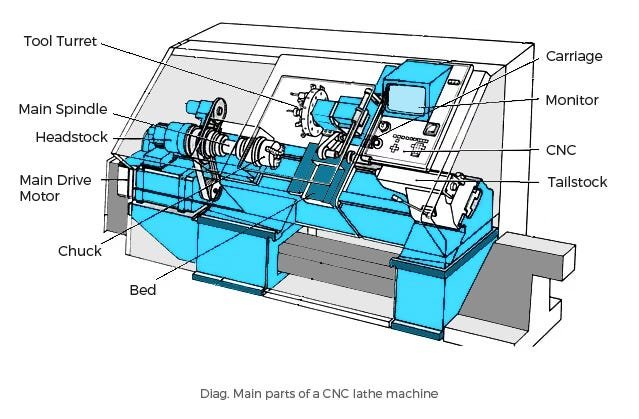
The G71 Rough Turning Cycle is one of the most commonly used canned cycles in Fanuc CNC Turning programming. Instead of writing multiple G01 cutting commands for every roughing pass, G71 automatically removes material in multiple passes until the finished profile is reached.
This cycle is widely used in production because it reduces programming time, minimizes errors, and ensures consistent machining. Whether you're a beginner learning CNC programming or an experienced machinist looking to optimize cycle time, understanding G71 is an essential skill.
In this guide, you'll learn how the G71 cycle works, its syntax, programming examples, parameters, common mistakes, and best practices.
What is G71 Rough Turning Cycle?
G71 is a rough turning canned cycle used in Fanuc CNC lathes to remove excess material from the outside diameter (OD) or inside diameter (ID) of a workpiece.
Instead of programming each roughing pass manually, the programmer only defines the final part profile. The CNC control automatically calculates and performs multiple roughing passes based on the specified depth of cut.
This makes G71 one of the fastest and most efficient methods for rough machining.
Why Use G71?
Using G71 offers several advantages:
Reduces program length
Automatically generates roughing passes
Saves programming time
Improves machining efficiency
Reduces operator errors
Produces consistent material removal
Easy to modify when part dimensions change
For production environments, G71 is considered a standard programming practice.
G71 Two-Line Format
Most modern Fanuc controls use the two-line G71 format.
G71 U2.0 R0.5; G71 P100 Q200 U0.2 W0.1 F0.25;
Parameter Explanation
U (First Line)
Depth of cut for each roughing pass.
Example:
U2.0
The machine removes 2 mm material during each roughing pass.
R
Retract amount after every pass.
Example:
R0.5
The tool retracts 0.5 mm before returning to the starting position.
P
Starting block number of the profile.
Example:
P100
The profile begins at block N100.
Q
Ending block number.
Example:
Q200
The profile ends at block N200.
U (Second Line)
Finish allowance in the X-axis.
Example:
U0.2
Leaves 0.20 mm material for the finishing cycle.
W
Finish allowance in the Z-axis.
Example:
W0.1
Leaves 0.10 mm material in the Z direction.
F
Feed rate used during rough turning.
Example:
F0.25
Feed = 0.25 mm/rev
Complete Programming Example
Suppose we need to machine a stepped shaft.
Raw Material
Diameter = Ø60 mm
Final Part
Ø50 × 30 mm
Ø40 × 50 mm
Program
G50 S2500;
G96 S180 M03;
T0101;
G00 X62 Z2;
G71 U2.0 R0.5;
G71 P100 Q150 U0.2 W0.1 F0.25;
N100 G00 X50;
G01 Z0;
X40 Z-30;
Z-80;
N150 X60;
G70 P100 Q150 F0.1;
M30;
In this program:
G71 performs all roughing passes automatically.
G70 finishes the profile using the same geometry.
The programmer defines the profile only once.
This approach significantly reduces program size.
How G71 Works
The machining sequence is simple:
Tool moves to the start position.
Machine removes material by the specified depth of cut.
Tool retracts by the R value.
Tool returns safely.
Another roughing pass begins.
Process repeats until the finish allowance remains.
G70 performs the finishing pass.
The operator only needs to define the final contour.
G71 Type I vs Type II
Type I
Suitable for simple profiles.
Characteristics:
Straight turning
Steps
Tapers
Basic contours
Type II
Used for complex profiles.
Supports:
Pockets
Undercuts
Complex shapes
Reverse profiles
Not all CNC controls support Type II programming.
Best Practices
To obtain the best machining performance:
Use appropriate depth of cut.
Select correct insert geometry.
Choose the correct cutting speed.
Leave sufficient finishing allowance.
Verify the profile before machining.
Simulate the program whenever possible.
Use coolant for difficult materials.
Following these practices improves both tool life and surface finish.
Common Programming Mistakes
Wrong P and Q Numbers
If the block numbers are incorrect, G71 cannot locate the profile.
Incorrect Tool Position
Always position the tool safely before calling G71.
Finish Allowance Too Small
Leaving no finishing allowance may produce poor surface finish.
Large Depth of Cut
Excessive depth of cut can overload the insert and cause tool breakage.
Incorrect Profile Direction
The profile should be programmed continuously without unnecessary rapid moves inside the contour.
Example Machining Parameters
| Material | Cutting Speed | Feed | DOC |
|---|---|---|---|
| Mild Steel | 180 m/min | 0.25 mm/rev | 2 mm |
| Stainless Steel 304 | 120 m/min | 0.18 mm/rev | 1.5 mm |
| Stainless Steel 316 | 100 m/min | 0.15 mm/rev | 1.5 mm |
| Aluminium | 300 m/min | 0.30 mm/rev | 3 mm |
| Brass | 250 m/min | 0.25 mm/rev | 2.5 mm |
These values are starting recommendations. Always adjust according to machine rigidity, insert grade, workholding, and coolant conditions.
Advantages of G71
Shorter CNC programs
Faster programming
Automatic roughing passes
Reduced machining time
Better consistency
Easier program editing
Improved productivity
Standard Fanuc programming method
Frequently Asked Questions (FAQ)
What is G71 used for?
G71 is used for automatic rough turning of OD and ID profiles.
What is the difference between G70 and G71?
G71 removes bulk material during roughing, while G70 performs the final finishing pass using the same profile.
Can G71 machine tapers?
Yes. G71 supports straight, stepped, and tapered profiles. Advanced controls also support more complex contours.
Can G71 be used for internal boring?
Yes. By programming the appropriate internal profile and using the correct boring tool, G71 can be applied to ID roughing.
Should I always use G70 after G71?
In most production programs, yes. G71 intentionally leaves finishing allowance, and G70 removes that remaining material to achieve the final dimensions and surface finish.
Conclusion
The G71 Rough Turning Cycle is one of the most powerful productivity features available in Fanuc CNC turning controls. Instead of manually programming every roughing pass, G71 automatically calculates and executes the rough machining process based on the final profile.
By understanding the syntax, selecting proper cutting parameters, and following programming best practices, you can create shorter, cleaner, and more reliable CNC programs while reducing machining time and improving overall efficiency.
Continue Learning with TSRCNC
Want to master Fanuc CNC programming?
Explore TSRCNC for practical CNC programming tutorials, machining calculators, G-code references, threading tools, and real-world manufacturing guides designed for CNC operators, setters, and programmers.
Community Discussion
Post a Comment