Windows Desktop CAM Software • Beta V0.1 • 100% Free

C FOR CAM — Free CNC Milling & VMC Desktop Software

Engineered for precision job shops, CNC milling operators, and engineering workshops. Create 2D & 3D milling toolpaths, verify machining operations with 3D stock backplot simulation, and generate clean Fanuc & ISO G-code — completely offline on Windows with zero license fees.

Open 2D Web CAM Tool
Windows 10 & 11 (64-bit) Offline Standalone Installer No License Key Required Free Beta V0.1 Access
... Verified Downloads
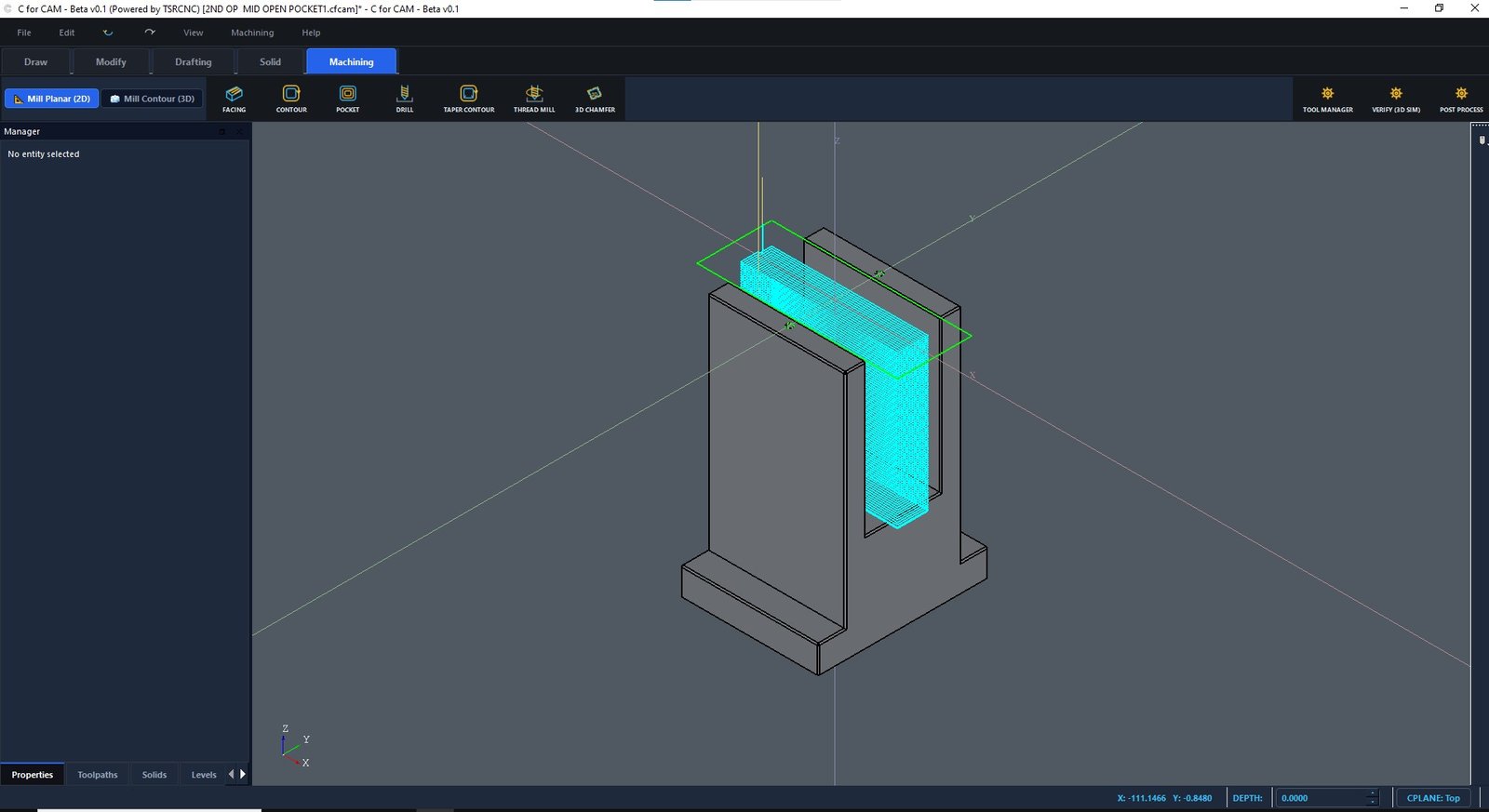
C FOR CAM (Beta V0.1) — CNC Milling & Simulation Workspace
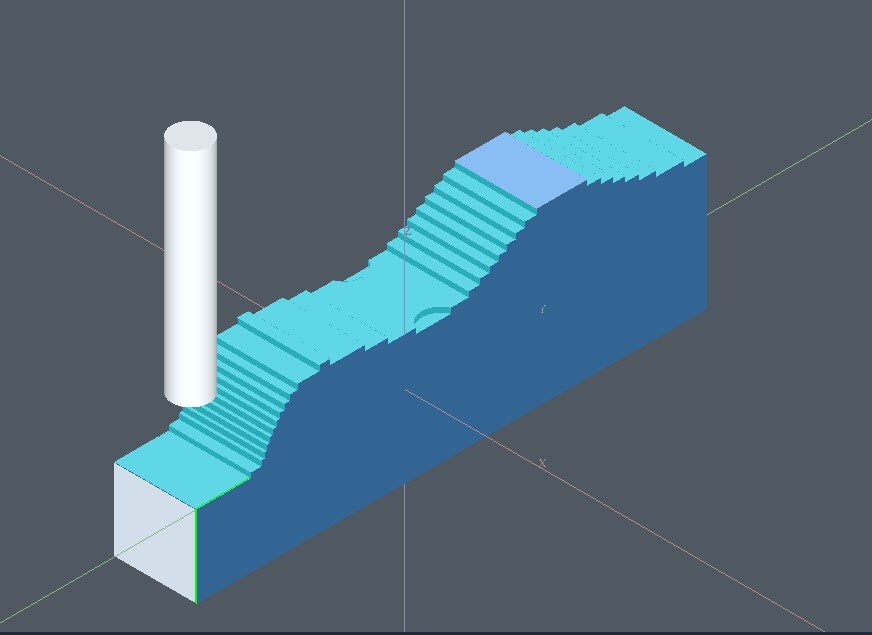
C FOR CAM 3D Stock Simulation and Tool Collision Verification
Realistic 3D Stock Simulation & Material Removal
C FOR CAM 2D and 3D Milling Toolpath Workspace and Operations List
Multi-Operation Toolpath Generator & G-code Post

What is C FOR CAM?

C FOR CAM is a dedicated CAD/CAM Windows desktop software developed by TSRCNC to bridge the gap between expensive enterprise CAM suites and practical machine shop requirements. Built specifically for CNC vertical machining centers (VMC), it gives engineers and machinists a free, lightweight, high-performance desktop environment to generate production-ready G-code.

Core Milling Operations & Toolpaths

C FOR CAM combines essential 2D planar milling and specialized 3D surface operations into an intuitive, zero-bloat workflow.

2D Planar Milling Operations

Full support for daily workshop milling tasks. Configure parameters like RPM, feed rate, depth of cut, stepover, and lead-in/lead-out with total precision.

  • Facing
  • Contour
  • Pocketing
  • Drilling & Pecking
  • Taper Contour
  • Thread Milling

3D Surface & Contour Toolpaths

Execute smooth surface finishes and edge preparations on complex geometric topographies with dedicated 3D cutting routines.

  • 3D Chamfering
  • Flowline Surface Milling
  • Constant Stepover
  • Ball & Bull Nose Tools

3D Stock Simulation & Backplot

Visually playback tool trajectories, verify layer-by-layer stock removal, and inspect cutter engagement to prevent costly part scrap and machine collisions.

  • Backplot Player
  • Speed Control
  • Gouge Detection
  • Stock Setup Preview

Fanuc & ISO G-Code Post-Processor

Generates clean, standardized CNC programs formatted specifically for industrial Fanuc milling controllers, Haas, Mitsubishi, and ISO standard machines.

  • Fanuc 0i / 31i / 32i
  • Haas Compatible
  • ISO G-code
  • Direct File Export

Tool Library & Custom Tooling

Manage your workshop tool magazine easily. Store and reuse specifications for flat end mills, bull-nose cutters, ball end mills, center drills, and taps.

  • Endmills
  • Ball Nose
  • Thread Mills
  • Tool Magazine List

100% Offline Desktop Performance

Run directly on your shop floor PC without needing an active internet connection. Your CAD models and CNC programs never leave your local system.

  • Zero Lag
  • No Cloud Required
  • Data Privacy
  • Shop Floor Ready

System Requirements & Software Details

Lightweight and optimized to run smoothly on standard office and workshop desktop/laptop computers.

Operating System

Windows 10 / 11 (64-bit)

Processor (CPU)

Intel Core i3 / AMD Ryzen 3 or higher

Memory (RAM)

4 GB Min (8 GB Recommended)

Setup Package

Windows Installer (.exe)

Target Machine

CNC Milling / VMC (3-Axis)

Release Edition

Beta V0.1 (Free to Download)

How to Install and Program with C FOR CAM

Follow these four simple steps to go from blank stock to verified G-code on your CNC mill.

1

Download Installer

Click the download button, fill out your details, and receive the C_for_CAM_Setup.exe file directly.

2

Run Setup & Install

Launch the setup file on Windows 10 or 11. Follow the installation wizard to launch C FOR CAM on your PC.

3

Create Toolpaths

Draw or set up your geometry, select your milling operations (facing, pocket, contour, drill), and pick your cutting tools.

4

Simulate & Export G-code

Review the backplot simulation to verify motion, then export clean Fanuc/ISO G-code ready for your CNC machine controller.

Machining Safety Notice & Verification

C FOR CAM is currently released as Beta V0.1. While the software produces standardized ISO and Fanuc-style G-code, machining setups, offsets, workholding, and tooling clearances vary across workshops. Always inspect your toolpaths in the built-in backplot simulator and perform an air cut or dry run on your machine before physical material cutting.

C FOR CAM (Desktop) vs TSRCNC CAM (Online)

TSRCNC provides two tailored tools depending on whether you require offline 3D milling software or an instant browser tool.

Capability C FOR CAM (Desktop Application) TSRCNC CAM (Online Web Tool)
Primary Focus Full CNC Milling & VMC Programming Quick 2D Contours & G-code Drawing
Platform & OS Windows Desktop (10/11 64-bit) Any Web Browser (Chrome, Edge, Firefox)
Offline Operation Yes (100% Offline — No Internet Needed) No (Requires Active Internet)
Milling Toolpaths Facing, Contour, Pocket, Drill, Taper, Thread, Chamfer, Flowline 2D Profiles and Profile Contouring
3D Stock Simulation Yes (Integrated Backplot Player with Speed Control) Basic 2D Toolpath Preview
Tool & Stock Manager Yes (Comprehensive Tool Library) Standard Tool Parameters
Controller Output Standard Fanuc 0i/31i/32i, Haas, ISO G-code ISO Standard Milling G-code
Pricing & License Free (Beta V0.1) Free Online Access

Frequently Asked Questions

Find quick answers to common questions about C FOR CAM features, compatibility, and downloads.

What is C FOR CAM desktop software?

C FOR CAM is a free Windows desktop CAM application developed by TSRCNC specifically for CNC milling (VMC) programming. It generates machine-ready ISO and Fanuc-style G-code with 2D operations (facing, pocketing, contouring, drilling, thread milling) and 3D toolpaths (3D chamfer, flowline), complete with toolpath backplot simulation and offline workshop operation.

Is C FOR CAM free to download and use?

Yes, C FOR CAM (Beta V0.1) is 100% free to download and use with no subscription, no license key, and no hidden charges. It was built to empower CNC operators, small-scale industries (MSMEs), and mechanical engineers without burdening them with high software costs.

Which operating system does C FOR CAM support?

C FOR CAM is a native Windows desktop application built for 64-bit Windows 10 and Windows 11. It operates entirely on your local machine and does not depend on cloud servers or an active internet connection.

Are the generated G-codes compatible with Fanuc CNC controllers?

Yes. C FOR CAM generates clean, standardized ISO and Fanuc-compatible G-code syntax for vertical machining centers (VMC). It also works reliably with Haas, Mitsubishi, Siemens, and standard G-code controllers. Always verify code with a dry run on your machine.

Does C FOR CAM have toolpath backplot simulation?

Yes. C FOR CAM includes an integrated 3D backplot window that animates the cutter movement with play, pause, and speed adjustment controls, allowing programmers to inspect tool motion and prevent machine collisions before running on physical CNC machines.

What is the difference between C FOR CAM and TSRCNC CAM?

C FOR CAM is a standalone Windows desktop software offering advanced 2D and 3D milling toolpaths, tool library, stock setup, and offline backplot simulation. TSRCNC CAM (accessible at tsrcnc.in) is a lightweight online browser tool for quick 2D geometry drawing and basic G-code generation with zero installation.

Does C FOR CAM support CNC lathe (turning) operations?

No. The current C FOR CAM Beta V0.1 is exclusively dedicated to CNC milling (VMC) operations. Lathe and turning modules are in active research and planned for future major releases.

How do I download and install C FOR CAM?

Click any of the download buttons on this page. Enter your name, email, and WhatsApp number in the secure modal, and the Windows installer (C_for_CAM_Setup.exe) will download immediately. Run the installer to start programming.
Ready to Power Up Your CNC Milling Workshop?

Download C FOR CAM Beta V0.1 today. Experience intuitive 2D & 3D toolpath creation, backplot verification, and Fanuc G-code generation for free.

Free Windows Setup Instant Direct Download Free Beta V0.1 Access